















Zuhio Keyword Count Checker is a simple online tool for counting keyword use in text. It also helps measure keyword density, so writers can review balance before publishing.
What Zuhio Keyword Count Checker Does
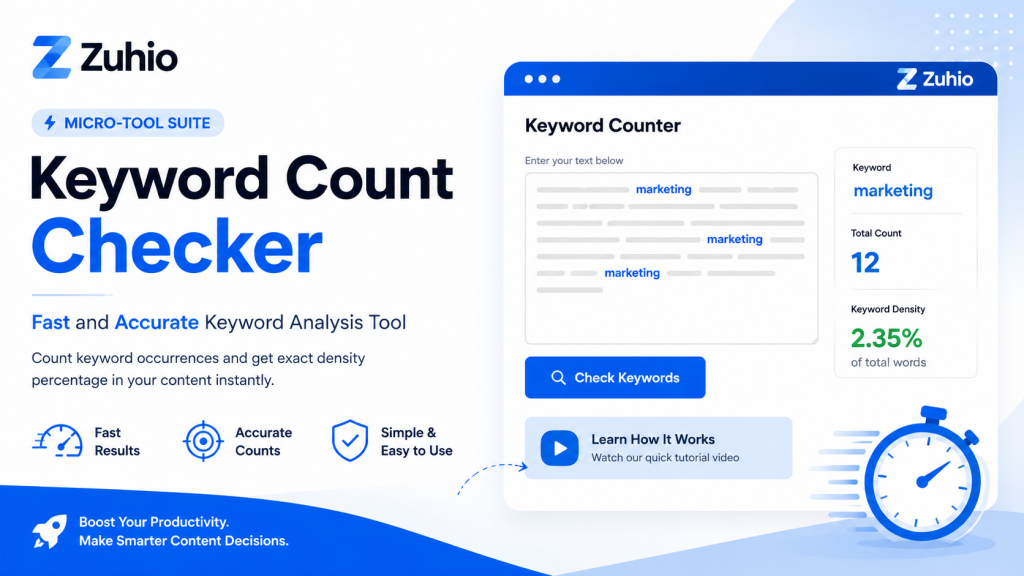
Zuhio presents the tool as part of its micro-tool suite, with a clear focus on productivity and business use. On the main page, the product is labeled “Keyword Count Checker,” with a “Keyword Counter” section and a “Check Keywords” action. The page also points users to a tutorial video, which shows that the tool is meant to be easy to learn and quick to use.
Public descriptions of the tool say that it scans written content and reports how many times a keyword appears, along with its density as a percentage of total words. That makes it useful for checking whether a draft uses a keyword too often or not enough. The tool is described as focused and lightweight, not as a full SEO platform.
Why Keyword Count Matters in SEO
Keyword count still matters because search engines use words on a page to understand the topic. Google recommends using words people would search for and placing them in important spots such as the title, main heading, alt text, and link text. That is one reason writers check keyword use before publishing.
At the same time, too much repetition can hurt a page. Google defines keyword stuffing as filling a page with keywords or numbers in an attempt to manipulate rankings, especially when the words appear unnaturally or out of context. Google also says content should be helpful, reliable, and made for people first. A keyword checker helps writers stay near that balance.
How the Tool Works
The workflow is straightforward. Public guides describe a simple process where the user opens the tool, pastes content, enters a keyword, and checks the result. The output is usually the keyword count and the density percentage. That makes the tool practical for editors who want a fast scan during the final review stage.
A simple use flow looks like this. Each step is short and direct.
- Open the Zuhio Keyword Count Checker in a browser.
- Paste the article, page copy, or draft text into the tool.
- Enter the keyword or phrase you want to check.
- Run the check and review the count and density.
- Edit the text if the keyword feels too weak or too repetitive, then check again.
What Keyword Density Means
Keyword density is the share of total words in a text that belongs to a keyword or phrase. AppTweak defines it as the percentage of times a keyword appears in a text compared with the total number of words. That is the basic idea behind most keyword counter tools.
A density check does not tell the full SEO story, but it does help with editing. If a phrase appears too often, the copy may sound forced. If it appears too rarely, the topic may not feel clear enough. SEO Review Tools describes a similar process by counting repeated words and phrases, which shows why keyword counting is a common editing step in SEO work.
What the Tool Does Not Replace
A keyword count checker is not a full SEO audit tool. Public descriptions of Zuhio’s checker say it focuses on frequency and density, not backlinks, technical SEO, or keyword research data such as search volume. That means it is best used as a content editing tool, not as a complete ranking tool.
It also does not replace topic research or search intent review. Google Search Central says helpful content should be people first, and Google’s SEO resources recommend placing useful words in prominent locations while keeping the page natural. A keyword checker can support that work, but it cannot decide the right angle, the right audience, or the right level of detail by itself.
Google also says the keywords meta tag is not used in web search ranking. That matters because some writers still confuse keyword counting with old meta keyword ideas. The better use of a checker is to review visible content, not to build pages around hidden keyword lists.
Best Uses for Writers and Editors
The tool is useful during the final edit of blog posts, landing pages, service pages, and product descriptions. It helps catch repeated phrases that may sound awkward to readers. It also helps confirm that the main keyword appears in important places without being repeated too often. Google Search Central recommends natural language and warns against stuffing keywords into titles, links, and alt text.
It is also useful when a page has a clear target phrase. For example, a page about a keyword checker, an SEO guide, or a product feature page can use the tool to review phrase balance before publishing. Google says search systems aim to prioritize helpful, reliable content, so the goal is not just to repeat a term. The goal is to make the topic clear in a way that still reads smoothly.
For editors, the tool works well as a quick quality check. It fits into the last stage of review after writing, formatting, and basic proofreading. Since Zuhio describes its tools as smart micro-tools for productivity, the checker fits the role of a small utility that solves one task well.
People who follow online financial updates may also want to read our detailed guide on the Rumored $697 Direct Deposit Payment, including eligibility discussions, payment claims, and the latest available information.
Common Checks Before Publishing
Before publishing, it helps to review the title, main heading, body copy, alt text, and links. Google specifically recommends using descriptive words in those places and keeping the language natural. A keyword checker can help confirm whether the target phrase appears enough times to support the topic without becoming repetitive.
It also helps to compare the final draft with the original intent of the page. If the content starts to sound robotic, the count is probably too high. If the main topic is unclear, the count may be too low. Google’s guidance on keyword stuffing makes the rule simple enough. Repetition should never make the page hard to read.
Where Keyword Count Checker Fits in SEO Work
Zuhio Keyword Count Checker fits best as a content polishing tool. It gives a quick view of keyword usage, which helps writers make clean edits before a page goes live. That is especially useful when the page already has a target keyword and the job is to refine how naturally that keyword appears in the text.
Used well, the tool supports clearer writing, cleaner on page SEO, and better content balance. Google’s own guidance supports that approach by encouraging helpful content, natural wording, and descriptive placement of important words rather than repeated keyword blocks.

If you create educational or technology-related content, check out our complete guide to Geometry Learn v3, a learning platform designed to help students improve their geometry skills through interactive lessons and practice tools.


